This is a two-part assignment.
Part A: Easy Intro to AI
- Create a free account on https://course.elementsofai.com/
- Go through at least the high-level overview, Chapter 1: What is AI?
- If you want to browse other topics, go for it.
- Submit a screenshot showing that you've logged into the course and are in the first chapter.
Part B: Setup or verify installation of Anaconda platform
- If you don't have it already, go to https://www.anaconda.com/products/individual
- Then, download and install the Individual Edition (free, open source) on your machine.
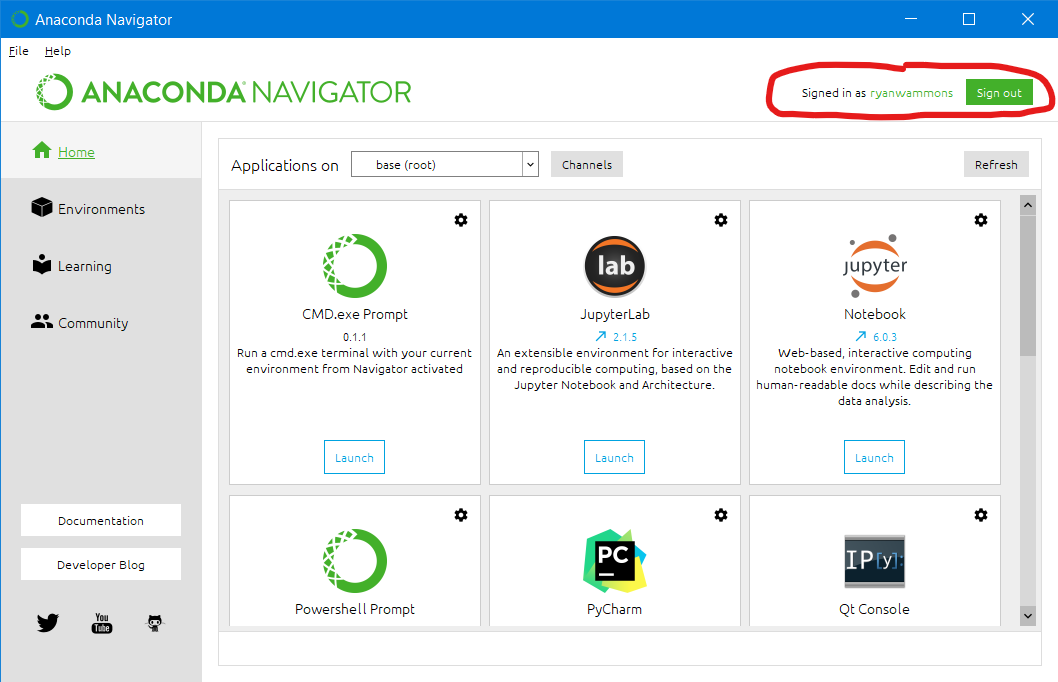
- Open the Anaconda Navigator and create an Anaconda cloud account.
- Then, login within the Navigator using that account.
- Submit a screenshot showing the Anaconda Navigator window with YOUR username. See the example of mine below (ryanwammons):
Your submission will consist of TWO SCREENSHOTS (one for part A, one for part B) pasted into one Word document.
Accepted file formats: all images copied into a single Word doc (.docx).
You may have to make multiple submissions to submit more than one image--make sure BOTH images are actually submitted. (or the easier option of a single Word doc containing both images)