- Run the AWS Academy Lab 3: Getting Started with AutoGluon.
- All assets: mod01_lab03_autogluon.zip
- Note that autogluon does not support Python beyond 3.12
- Colab currently has Python 3.12 -- https://colab.research.google.com/
- Code changes
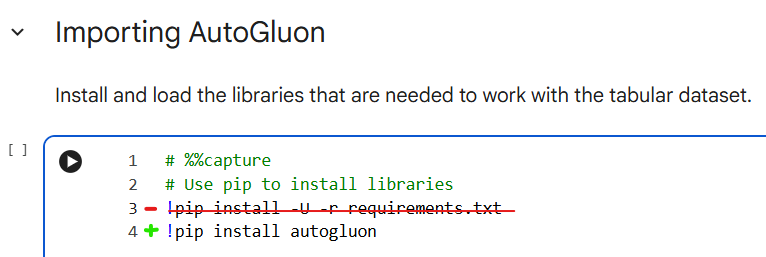
- Replace
!pip install -U -q -r requirements.txtwith!pip install autogluon - Delete the line
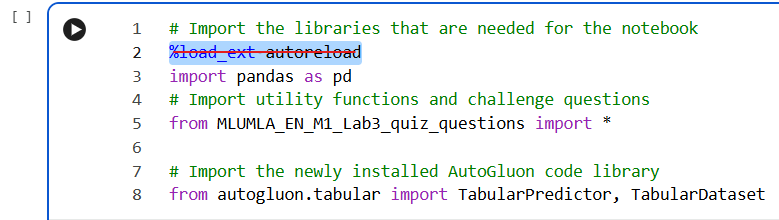
%load_ext autoreloadfrom the next cell
- Replace
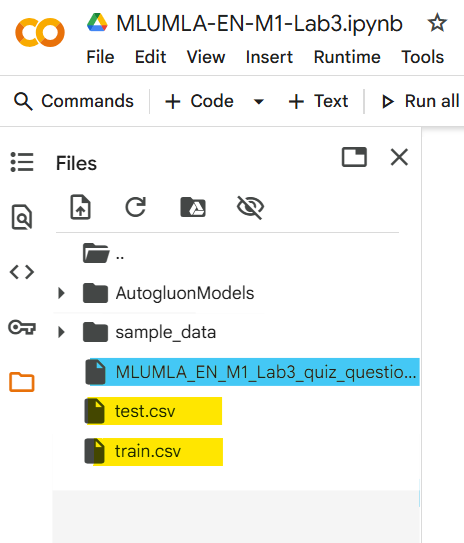
- Upload the data files (test.csv and train.csv) and the Python quiz file (MLUMLA_EN_M1_Lab3_quiz_questions.py), placing all three (3) files in the main folder:
- Code changes
- All assets: mod01_lab03_autogluon.zip
- Answer the questions at the end, which are reproduced below--and also provide at least one screenshot showing that you've run the lab. (type text and paste screenshot(s) into a single Word doc):
- What is the shape of the training dataset?
- What type of ML problem (i.e., classification or regression) does AutoGluon infer? (Hint: Remember, you didn't mention the problem type. You only provided the label column.)
- What does AutoGluon suggest in case it inferred the wrong problem type?
- What kind of data preprocessing and feature engineering did AutoGluon perform?
- What are the basic statistics about the label in the print statements from AutoGluon?
- How many extra features were generated in addition to the originals in the dataset? What was the runtime for that?
- Which evaluation metric was used?
- What does AutoGluon suggest in case it inferred the wrong metric?
- What is the ratio between the training and validation dataset? (Hint: Look for
valorvalidation.) - Where did AutoGluon save the predictor?
- Which folder were the models saved in?
- What file format are the models in? (Note: Look at the file name suffix. You don't need to open the file.)
SUBMIT in a single Word doc (docx):
- numbered text of your responses to the above questions
- at least one pasted screenshot showing you ran the lab